

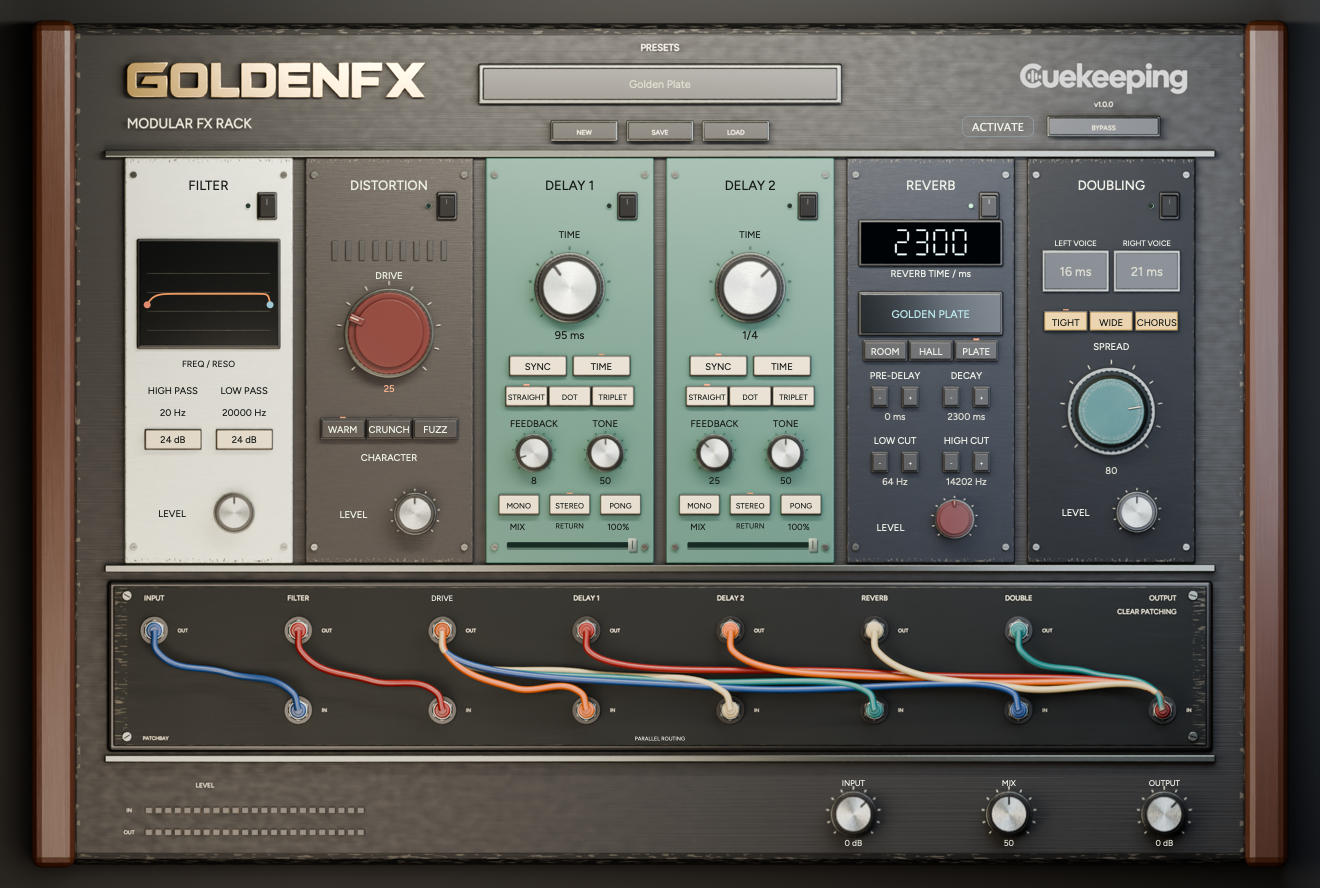
Patch your own character.
Filter, distortion, 2 Tape delays, reverb and doubling. Put them in series or split the signal into parallel paths. The cables make the chain yours.
Choose your
format.
Try every feature free for 14 days. No card required. Open GoldenFX in your DAW and verify your email to start its own trial.
Mac
macOS 12 or later. One signed, notarized installer includes AU and VST3 for Intel and Apple Silicon.
Windows
Windows 10 or later for x64; Windows 11 for native ARM64 / ARM64EC. Choose the architecture that matches your DAW. Windows installers are unsigned.
Every package includes its installer and user manual. Read the manual.
Mac · Windows x64 · Windows ARM
GoldenFX
Choose your platform.
Choose the installer that matches your computer and DAW. Each download includes the user manual.
Using an x64 DAW on Windows ARM? Choose Windows x64. Native ARM DAWs use the Windows ARM package.
Build the chain.
Series or parallel
Start with a serial insert setup or parallel INIT. Clear the patchbay and build a new route when you want a different sound.
2 Tape delays
Use tempo sync or free time, with straight, dotted and triplet timing. Choose Mono, Stereo or Pong, then set Feedback, Tone and the independent Mix faders.
Reverb and doubling
Choose Golden Room, Hall or Plate. Add Tight or Wide doubling, or move toward Chorus.
Keep the starting point.
Save your settings as a user preset. Use Return and Insert behavior to fit the effects to the chain you're building.
Your next sound
starts here.
Get a first listen to what we're making next.
Build your
next chain.
Series vs. parallel effects in GoldenFX
Hear how effect order and parallel routing change a sound. Build a series chain or split paths with GoldenFX, then compare at a similar output level.
Insert vs. send effects in GoldenFX
Set up GoldenFX as an insert or a send return. Understand module Insert/Return behavior, the independent master dry path and parallel level changes.
Use GoldenVox and GoldenFX on a vocal
Shape vocal tone and dynamics with GoldenVox, then add delay, reverb or doubling with GoldenFX. Use 2 separate plugins from the Golden Bundle.
Before you get started.
What does GoldenFX include?
Filter, Distortion, Delay 1, Delay 2, Reverb and Doubler in a patchable effects rack.
Can I patch the effects in parallel?
Yes. Split the signal into several paths and merge them again, or build a serial insert chain. Feedback loops between modules aren't supported.
How do the trial and license work?
Verify your email in GoldenFX to start its own 14-day trial. Activate a purchase with your checkout email on up to 2 computers.
Is the Golden Bundle 1 plugin?
The bundle includes GoldenFX and GoldenVox as 2 separate plugins. Use either one on its own.